Paul Hammant's Blog: Live Verify
Nobody cares about a thing in the tech world until it is successful, and I have something here that could be, but isn’t yet. Its a brand new idea and has an immense chasm to cross. Most of it is an adoption/patronage chasm, but there are technical challenges too.
I’ve blogged before on this enough to have timed out any change of filing a patent on it. So there’s no way I could make a SaaS that would have some exclusivity to operate based on patent. Not that patents really protect business ideas these days anyway.
Live verify links
- GitHub home page: live-verify.github.io/live-verify/
- GitHub Repo: github.com/live-verify/live-verify
This is me and ClaudeCode mostly. Me reminding Claude that I really really like automated tests.
The home page has screenshots of live-verify in action (before, after verification, trust statement), and some real videos of tests running. Some of those videos are me showing camera apps, and some are voiceless screen recordings of a larger multi-tier simulation of all the tech pieces. The home page also links to 480 or so use cases (and has a search feature).
What is it?
A system to verify a document or part of a document in your hands that might be way away from the system that produced it. And verify means a claim within - could be just a rectangle of text mid way through the document. Could be 20 rectangles and 20 verifications. The could also be from something that’s printed and in front of you, using a camera-using phone app. Perhaps only for small rectangles of text. Most of the time you’ve the document as a digital document. Say a PDF or a web page. In that case the verification is via a Chrome extension. In time the same tech is built into Adobe, Outlook, MsWord etc. At some point it is in the OS and the need for a chrome extension disappears.
There’s 480 use cases that are listed. Maybe that’s only 280 after consolidation. Uses cases are anti-fraud, safety, and accountability. To say more, use cases cover preventing document fraud (fake certificates, forged receipts), verifying safety credentials (building inspectors, healthcare workers, equipment compliance), and enforcing accountability (audit trails, regulatory compliance, chain of custody). “Accountability” is a catch-all though. It captures the compliance, ethics, audit, and delegated-authority themes that don’t fit neatly under fraud or safety.
Most of the time it is about reducing costs of things by rolling back fraud, because fraudulent claims would now be easier and quicker to identify and avoid the consequences of. Yes, “claim” in an insurance thing, but I’m talking about more general use like this claim “I, Jimmy Cricket, worked at Microsoft in Seattle from 2010 to 2013 in the DevOps team”, or “Mr Alex E Spooner earned his millions from his family’s corner shop and not from selling drugs at all. He would make a great investor”. Other uses, could be ID systems with a camera app confirming the person with the eInk badge-ID is actually a police officer. That’d need rules of conduct for those verification moments.
The system rests on Human eyes being quickly able to scan a claim, and wonder “I would trust this if only there was a way of verifying it as true”, then a button press and some maths suggesting it is true (is “verified”) and a chain of trust that human eyes can also quickly scan toward another trust or not trust decision. And a system that’s much more trustworthy than presentation and use of QR code.
No personal data ever leaves your device. The text is captured, normalized, and hashed entirely on-device. Only the hash — a one-way fingerprint that reveals nothing about the document — is sent over the network. The verification endpoint never sees your degree certificate, salary receipt, or passport. Tens of thousands of cryptography PhDs could testify in court that hashing is irreversible.
The maths is hashing - SHA256 by default, but could be stronger or weaker. Some education needed for ordinary people to broadly understand why it is one-way. The hashes are all in public and not indexed. You know the hash, you can see the payload (default would be { "status":"verified" }). You don’t know the hash, you can’t discover it, subject to the plain-text’s entropy.
Revocation is built in. “Verified” isn’t permanent. An issuer can change the status to revoked, suspended, or expired at any time — just update what the endpoint returns. A doctor loses their license, a certificate is superseded, an employee is terminated: the next person who verifies sees the current status, not a stale “OK.” This is what static digital signatures can’t do.
Trust rests on the domain, not the app. There’s no central authority or certificate registry. You decide whether ed.ac.uk is an authority for Edinburgh degrees, or whether coned.com is an authority for utility worker badges. The verify: line on the document tells you whose domain is making the claim — and that domain can declare who authorized it. For example, in the automated tests there’s a James Whitfield bank statement from Meridian National Bank with verify:meridian-national.bank.us/statements. The extension verifies the hash, then walks the authority chain: Meridian National Bank says it’s authorized by the FDIC (fdic.gov), which in turn is authorized by the US Treasury (treasury.gov). The verifier sees the full chain and decides whether to trust it.
So we have two camera-using phone apps, and a Chrome extension. Ideally we’d go on to make some plugin for Acrobat and Outlook and more. The Chrome extension is working well, but the camera-apps have upper limits. One is size of “document” to be verified which is understandable as OCR though a camera lens isn’t perfect. The other is tabular data - read on for more on that.
I wish there was more shared code, between the implementations:
| Platform | Normalization | Hashing |
|---|---|---|
Web app (public/normalize.js) |
JavaScript (canonical) | Web Crypto API |
Chrome extension (shared/normalize.js) |
JavaScript (auto-generated copy via scripts/sync-shared.js) |
Web Crypto API |
| iOS app | JavaScript via JSBridge (runs normalize.js directly) | CryptoKit (native Swift) |
| Android app | JavaScript via Rhino (runs transpiled normalize.js) | Native MessageDigest |
The web-app version was were I started with this some months ago. It used Tesseract OCR and would run online just asking for the camera. Tesseract (via WASM) was really problematic so I shifted to proper apps ahead of schedule.
I also have a reference backend that we use in the built-in automated tests. The possibly hundreds of SaaS companies that supply into this space may make different choices. The value is the open standard here.
Post-Verification Actions
Verification doesn’t have to stop at “verified.” There are two sources of follow-up actions.
The first is the app or phone itself. If you’re scanning a coffee shop receipt and you have Expensify installed, the app can offer “Send to Expensify?” — that’s a client-side decision based on context, and a choice for you to accept or ignore. The receipt issuer doesn’t know or control what’s offered. The second is the verification endpoint deliberately returning actions in its response. A building inspector’s badge could offer a form for the homeowner to record visit details (areas accessed, duration, any concerns). A lawyer’s credentials could link to the bar association’s public disciplinary record. These are issuer choices — the endpoint decides what to offer.
The endpoint pattern scales from light (a link) to strong (a POST form for reporting). The strong version matters where there’s a power dynamic — an inspector at your door, a healthcare worker with a vulnerable patient. The verification response tells the verifier “you may record details of this interaction” and explicitly says they will never be told not to.
Current Tech Problems
Live Verify’s camera mode works beautifully for prose documents — certificates, references, claims where text flows continuously line by line. Point your phone, tap verify, done.
But tabular data — receipts, invoices, anything with left-aligned descriptions and right-aligned prices — breaks the pipeline. Many of the use cases involve tabular data.
What Works: Prose
An employment reference like this verifies perfectly:
I, Paul Hammant, worked for Kevin Behr in
his role as CIO of HedgeServ in New York City
in 2015 and 2016
verify:paulhammant.com/refs
The text flows left-to-right with no gaps. The OCR engine (Apple Vision on iOS, Google ML Kit on Android) sees one contiguous block of text. Verification succeeds.
What Breaks: Tabular Receipts
A coffee shop receipt like this fails:
Flat White                £3.40
Almond Croissant          £3.25
SUBTOTAL:                 £6.65
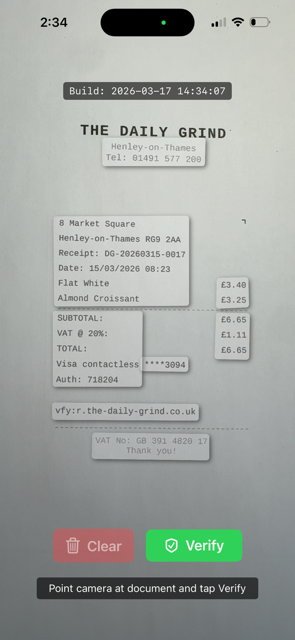
Where a human sees one line, the OCR engine sees two separate text blocks — “Flat White” and “£3.40” — because the visual gap signals “these are separate regions.” A receipt that should be one block becomes 10+ fragments. Both iOS and Android camera apps I have made attempting to use Live-Text features of the OS show up to 10 fragments. And that’s the best case sometimes there’s 7 and some crucial numbers on the right hand side are omitted completely.
Where This Leaves Us
| Document Type | Clip Mode (Browser) | Camera (Android) | Camera (iOS) |
|---|---|---|---|
| Short prose (peer references, badge claims) | Works | Works | Works |
| Longer prose (certificates, full letters) | Works | Works (OCR errors creep in) | Works (OCR errors creep in) |
| Tabular (receipts, invoices) | Works | Works (stitching) | Broken (single-rectangle) |
Clip mode — the browser extension — handles everything perfectly because it operates on digital text, not pixels. No OCR, no rectangle fragmentation.
The Real Fix: Registration Marks for Tabular Data
Our stitching on Android is a workaround. It handles the common case but it’s fragile — font size changes, multi-column layouts, and unusual spacing can all defeat Y-coordinate grouping.
The proper solution is for Apple and Google to support registration marks for tabular data in their OCR APIs. Two marks at diagonal corners define a bounding rectangle. The OCR engine sees the marks, treats everything inside as one text block, and strips the marks from the output — like a QR finder pattern that the camera uses for orientation but doesn’t include in the payload.
We already have one mark: the vfy: line at the bottom-left of every verifiable region. A Unicode corner character — ⌝ (U+231D, upper right corner) — on the first line at the right margin provides the opposing corner:
8 Market Square                 ⌝
Henley-on-Thames RG9 2AA
Flat White                  £3.40
Almond Croissant            £3.25
SUBTOTAL:                   £6.65
vfy:r.the-daily-grind.co.uk
It’s already in the pic I took above.
The ⌝ is a control mark, not content. The OCR engine consumes it for bounds detection and omits it from the text output, just as it would omit a QR finder square. The vfy: line stays — it’s already part of the verification protocol and already in the OCR output.
Why a Unicode character rather than an image or a special printed mark? Because it works everywhere text works: HTML, PDF, LaTeX, Word, thermal receipt printers. Any system that can render U+231D can print the mark. No image embedding, no special font, no binary format dependency.
This is future work — it requires Apple and Google to recognize the ⌝ + vfy: pair as a single region boundary in their Vision and ML Kit frameworks. But the convention is simple, the marks are unobtrusive on the printed document, and the benefit is large: receipts, invoices, lab results, bank statements, and every other tabular document becomes verifiable by camera.
Until then, camera apps work better for prose, and clip mode works for everything - including most of the anti-fraud cases.